


Original price was: $29.00.$0.00Current price is: $0.00.
Description
Qwik Paste makes multitasking feel effortless by turning your clipboard into a powerhouse. Built for Windows, this tool eliminates the tedious steps of saving, naming, and browsing for files every time you copy something. Instead, it lets you drag and drop copied images, audio, and files directly into almost any app, from Photoshop to Slack, without cluttering your desktop or breaking your concentration. One standout feature is its automatic download from copied URLs, meaning you don’t have to manually fetch visuals or assets anymore. Combined with its customizable shortcuts and clean background performance, Qwik Paste transforms a typically slow, mouse-heavy process into a fast, flow-friendly experience.
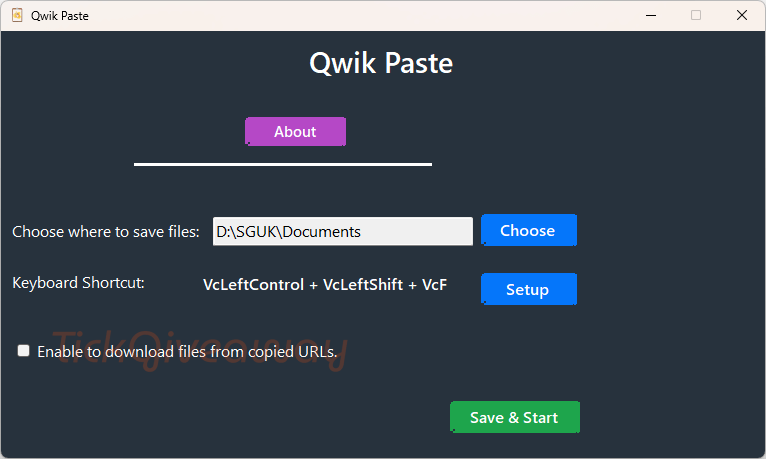
Still, Qwik Paste isn’t without limitations. It only supports Windows environments, so Mac and Linux users are left out. While drag-and-drop instant pasting works smoothly, actual behavior can vary depending on the destination app’s file format compatibility. Some users may also find the app’s minimal design too bare-bones compared to more feature-packed clipboard managers. Yet for creators, developers, or anyone whose work revolves around handling rich media, Qwik Paste strikes an effective balance between simplicity and power. It’s not a replacement for full file management tools but an efficient companion for speeding up everyday workflows.
Features
- Instant Clipboard-to-App Drag & Drop: Move copied images, audio, and files directly into any Windows app without saving first.
- Auto Download from Copied URLs: Automatically downloads assets like images and audio from copied links for immediate use.
- One-Click Image & Audio Use: Instantly paste copied media in native formats without manual conversion.
- Configurable Save Locations: Choose specific folders for stored files to keep your workspace tidy.
- Custom Keyboard Shortcuts: Assign hotkeys for faster access and uninterrupted workflow.
- Works in Any Windows App: Compatible with software like Photoshop, Figma, VS Code, browsers, and chat tools.
- Lightweight and Distraction-Free: Runs quietly in the background for seamless performance.
- Clipboard Content Retention: Keeps copied files accessible across different apps and windows.
- Clean Workflow Management: Prevents clutter in downloads and desktop folders.
- Focus-Oriented Design: Reduces context switching to maintain productive, deep work sessions.
Special Offer
Giveaway Instructions
1. Submit your name and email here to receive a free license: Giveaway link
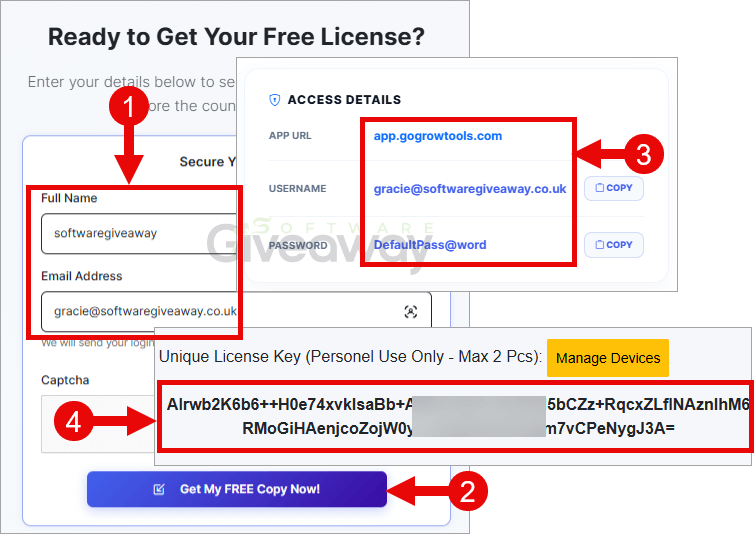
2. Download and install the software: Qwik Paste.zip
3. Launch the program, and activate it using the license key you received.
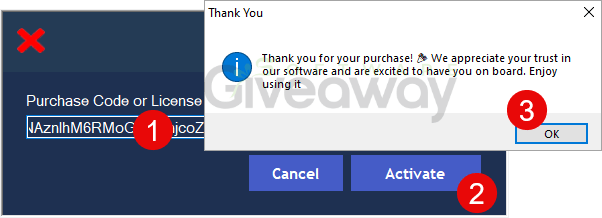
4. Enjoy the full version!
Terms and conditions
- This is a lifetime license
- You can’t upgrade the software for free.
- There’s no free tech support.
- End of giveaway promotion: Ending soon.
Additional information
Specification: Qwik Paste (100% Discount)
|
Reviews (0)
User Reviews
Be the first to review “Qwik Paste (100% Discount)”
You must be logged in to post a review.
Related Products


There are no reviews yet.