



Original price was: $47.00.$0.00Current price is: $0.00.
Description
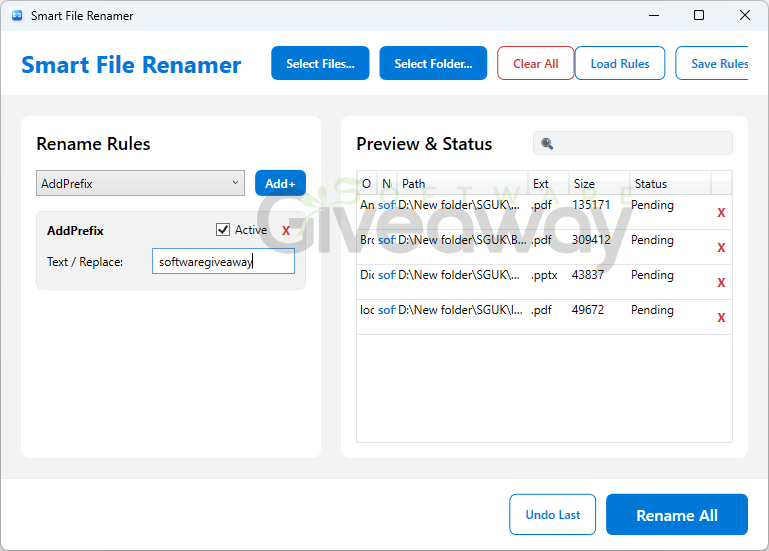
Smart File Renamer makes messy file libraries far easier to tame – without forcing users into risky, irreversible bulk changes. Designed for Windows 10 and 11, this desktop tool batch-renames files through a flexible rule-based workflow, supporting prefixes, suffixes, text replacement, character trimming, case conversion, dates, auto-numbering, and optional regex patterns. Its live preview compares original and proposed names before changes are applied, while conflict detection and session-based undo add useful safeguards. Users can also combine multiple rules in sequence, process folders and subfolders, and save presets for repeatable naming standards. Priced at a one-time $47 for a personal two-PC license, it includes updates, support, and commercial-use rights. It appears especially useful for high-volume organization, though occasional users may find simpler free renamers sufficient.
Features
- Describe the features in a list. Don’t categorize them. Use colons.
Bulk file processing: Rename hundreds or thousands of files at once, including files stored in folders and subfolders. - Rule-based renaming: Build custom workflows with multiple renaming rules applied in a chosen order.
- Prefix and suffix tools: Add consistent text before or after filenames.
- Text replacement and removal: Replace unwanted words, symbols, or character strings across a batch.
- Regex support: Use regular expressions for more advanced filename matching and edits.
- Character trimming: Remove a specified number of characters from filenames.
- Character filtering: Keep only selected characters to standardize filenames.
- Case conversion: Change filenames to UPPERCASE, lowercase, or Title Case.
- Date integration: Insert dates into filenames for clearer chronological organization.
- Smart auto-numbering: Add sequential numbers to organize files in a predictable order.
- Multi-rule pipeline: Combine several rules into one reusable renaming process.
- Live preview: View original and new filenames side by side before applying changes.
- Conflict detection: Identify duplicate or conflicting filenames before renaming.
- Safe undo: Restore original filenames with one-click undo.
- Session-based history: Track renaming activity during a session for easier reversal.
- Save and load presets: Store rule sets as templates and reuse them on later projects.
- Subfolder support: Import and rename files across nested folders.
- High-performance engine: Process batches of 1,000 or more files with an optimized, non-blocking Windows interface.
- Windows compatibility: Works on Windows 10 and Windows 11.
Special Offer

Giveaway Instructions
1. Submit your name and email here to receive a free license: Giveaway link
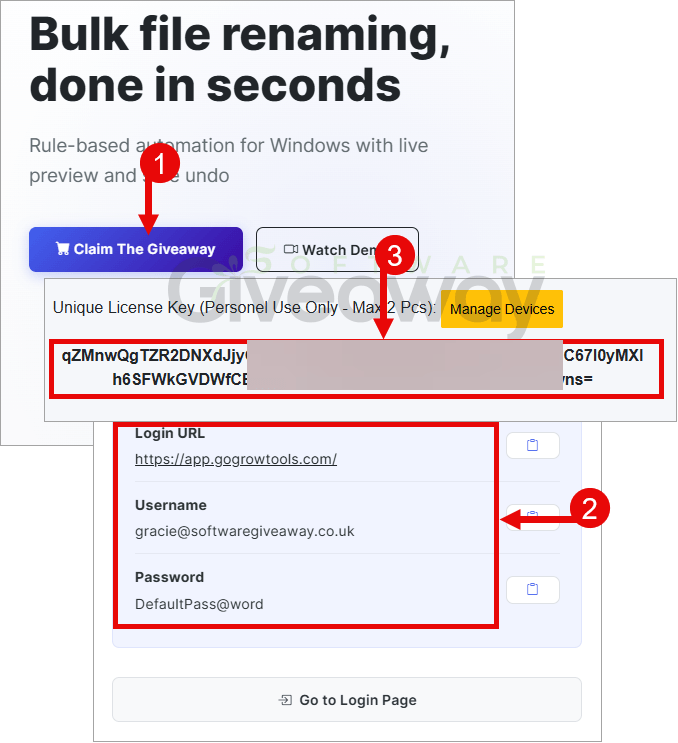
2. Download and install the software: Smart File Reamer.zip
3. Launch the program and activate it using the license key you received.
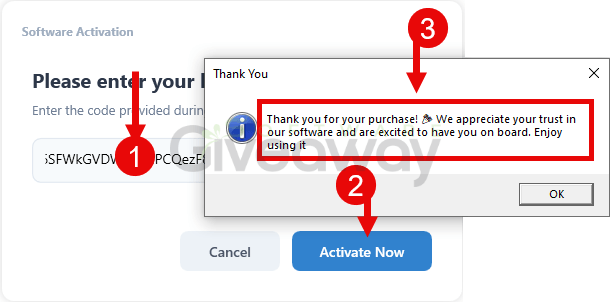
4. Enjoy the full version!
Terms and conditions
- This is a lifetime license for version 1.0.0.0
- You can’t upgrade the software for free.
- There’s no free tech support.
- End of giveaway promotion: Ending soon.
Additional information
Specification: Smart File Renamer (100% Discount)
|
Reviews (0)
User Reviews
Be the first to review “Smart File Renamer (100% Discount)”
You must be logged in to post a review.


There are no reviews yet.