
Vovsoft Copy Files Into Multiple Folders (100% Discount)

Original price was: $19.00.$0.00Current price is: $0.00.
Description
Looking to tackle the tedious task of copying files to multiple locations? Vovsoft Copy Files Into Multiple Folders could be the time-saving solution you need. This lightweight utility makes it effortless to batch copy, move, or mirror files and folders across numerous directories, saving users from repetitive drag-and-drop hassles. The interface is straightforward, and even non-technical users will find its controls self-explanatory. Features like drag-and-drop, processing logs, and environment variable path recognition enhance its usability. Notably, the software integrates with Windows’ “SendTo” menu, enabling easy right-click operations, and supports network drives and popular cloud storage platforms like Dropbox, Google Drive, and OneDrive
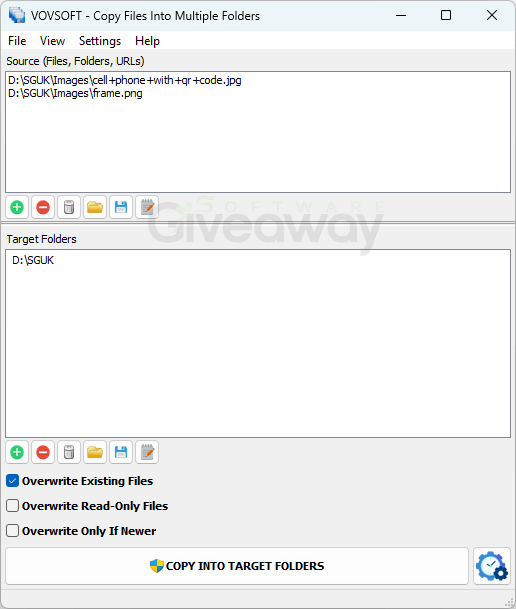
Beyond simple file copying, Vovsoft Copy Files Into Multiple Folders adds extra convenience with options to move (deletes source after copying) or mirror (clears the destination before copying) files. The added ability to schedule tasks makes it suitable for regular backups or multi-location file management. It supports multiple languages and a wide range of Windows versions, from XP through Windows 11.
Features
- Efficient batch copying: Enables users to copy multiple files to multiple directories in a single operation, saving time and effort.
- Drag-and-drop support: Simplifies adding files or folders for copying without navigating menus.
- Integration with Windows context menu: Quick access via the “SendTo” right-click menu makes it convenient.
- Compatible with network and cloud drives: Supports copying to shared network folders and cloud storage providers like Dropbox, Google Drive, and OneDrive.
- Move and mirror options: Beyond copying, users can move files (deleting the source after completion) or mirror folders (clearing the destination before copying).
- Customizable overwrite/skip rules: Users control what happens if files with the same name exist in the destination.
- Logging and reporting: Displays processing logs to track which files were copied or skipped for transparency and troubleshooting.
- Supports environment variables and wildcards: Enhances flexibility in specifying paths and automates file selection
Special Offer

Giveaway Instructions
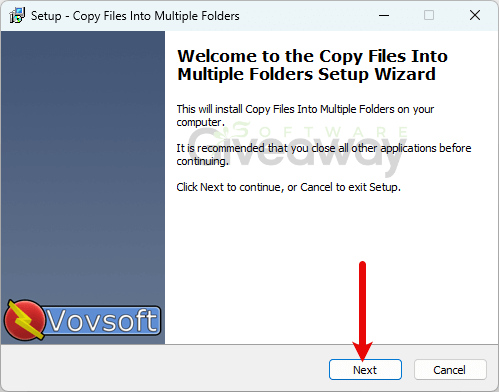
1. Download and install the software:
- Installer: copy-files-into-multiple-folders.exe
- Portable: copy-files-into-multiple-folders-portable.zip
2. Launch the program, click Help > > > Edit license, and activate it using this license key: 8ZE15-7YU2R-BNGX2
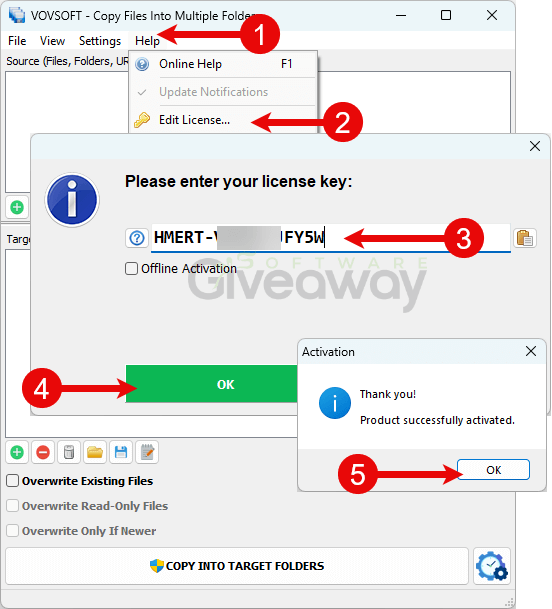
3. Enjoy the full version!
Terms and conditions
- This is a lifetime license for version 7.5.
- You can’t upgrade the software for free.
- There’s no free tech support.
- End of giveaway promotion: May 17, 2026.
Additional information
Specification: Vovsoft Copy Files Into Multiple Folders (100% Discount)
|
Reviews (0)
User Reviews
Be the first to review “Vovsoft Copy Files Into Multiple Folders (100% Discount)”
You must be logged in to post a review.



There are no reviews yet.